 (Image via
Have you ever felt like your digital life is just a bit too small for the screen you're using? Maybe you're juggling three different browser tabs, a Slack window, and a massive Excel sheet, all while constantly hitting Alt-Tab like your life depends on it. It's exhausting. It's the digital equivalent of trying to build a Lego masterpiece on a tray table. For years, the solution was simple: buy a second monitor. But anyone who's lived with a dual-monitor setup knows the "bezel gap" struggle. That annoying black plastic bar right in the middle of your field of vision is a constant reminder that your workspace is fragmented. By the time 2024 rolled around, the tech world had already shifted toward a more elegant solution. The ultra-wide monitor market hit a staggering $3.7 billion that year, and it's only grown since then as professionals realize they don't need more screens, they just need a better one.
Why Ultra-Wides Are Taking Over
When we talk about ultra-wides, we're usually looking at two main flavors. First, there's the 21:9 aspect ratio. Think of this as your standard monitor but with an extra 30 percent of "wingspan" on the sides. Then there's the 32:9 "Super Ultrawide," which is two 27-inch monitors fused together into one glorious, seamless panel.
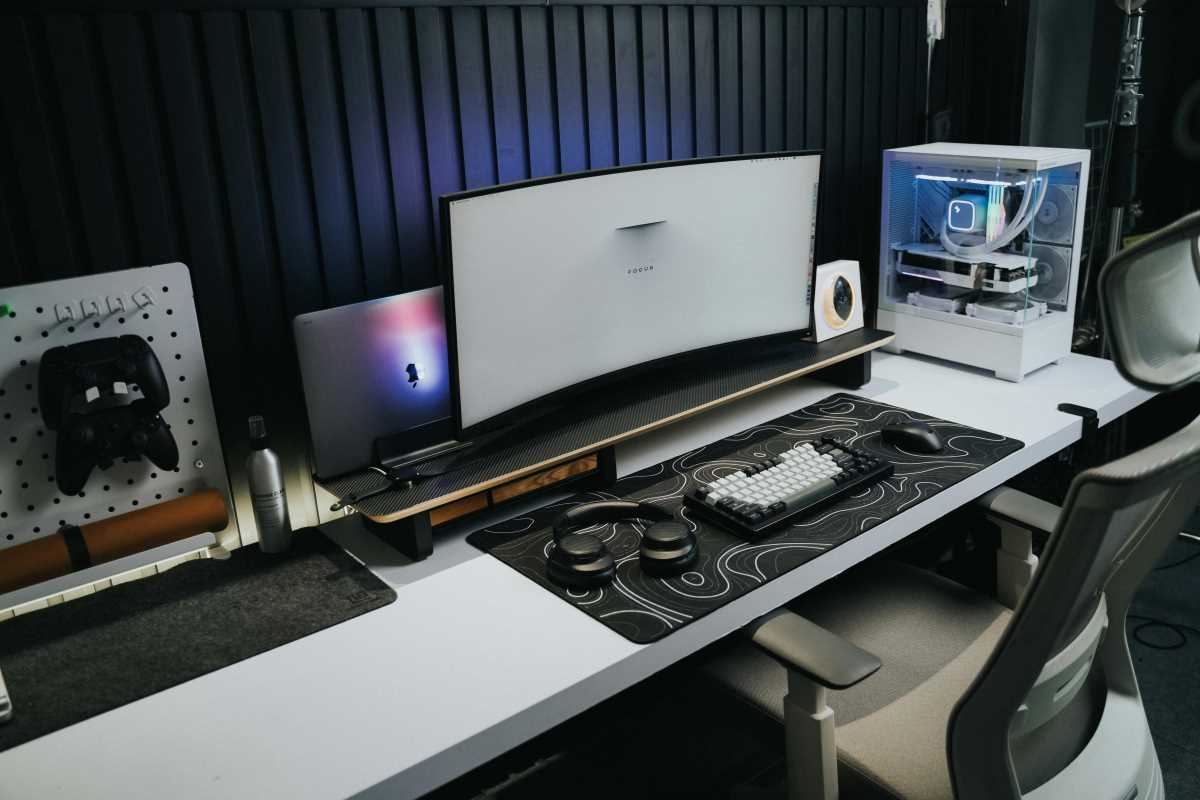
The immediate visual impact is hard to overstate. When you sit down in front of a 49-inch curved display, it doesn't just feel like a tool. It feels like a cockpit. The shift toward these massive displays is largely driven by the modern hybrid worker. Since we're often working from home, we've had to consolidate our digital real estate. We need one screen that can handle a Zoom call on the left, a document in the middle, and an email inbox on the right, all without a single cable-cluttered bezel in the way.
How Ultra-Wides Revolutionize the Worker Experience
So what does this actually mean for your daily grind? It's not just about having a bigger "TV" on your desk. It's about the psychological benefit of reduced context switching. Every time you Alt-Tab or minimize a window to find another one, your brain takes a micro-second to reset. Those seconds add up. A study from UC Irvine found that knowledge workers using ultra-wide monitors completed multitasking workflows 12 percent faster than those stuck with traditional dual-monitor setups.
If you're a coder, you can see hundreds of lines of code alongside your terminal and a preview window. If you're a video editor, your timeline can stretch out like a long highway, letting you see the whole project without constant scrolling. Even for the spreadsheet warriors among us, being able to see columns A through Z without moving a finger is a game-changer.
There's also a physical side to this. Have you ever noticed your neck feeling stiff after a long day of looking back and forth between two separate monitors? Research indicates that ultra-wides actually reduce "twisting scores," which is a fancy way of saying they keep your neck from straining. Because the screen is often curved, the edges are brought into your peripheral vision, meaning your eyes do the moving rather than your whole head.
Key Features to Look for in a Modern Ultra-Wide Monitor
If you're ready to make the leap, you shouldn't just buy the biggest screen you find. Resolution is the first thing to check. For a 34-inch monitor, you want at least UWQHD (3440 x 1440). Anything less and the text will look like it's made of Minecreate blocks. If you're going bigger, like a 40-inch or 49-inch model, look for 5K2K or Dual QHD resolutions to keep everything crisp.
The type of panel matters too. IPS panels are usually the gold standard for color accuracy and viewing angles, which is important if you're doing creative work. VA panels, on the other hand, offer better contrast, making those blacks look truly black rather than a muddy gray.
Then there's the "one cable to rule them all" factor. Look for a monitor with Thunderbolt 4 or USB-C docking. Modern monitors can now deliver up to 140W of power. This means you plug one cable into your laptop, and it handles the video signal, connects your mouse and keyboard, and charges your computer all at once. It's the ultimate way to kill "cable spaghetti" for good.
Top Picks for Every Budget Transforming Your Workspace Now
1. The Professional Powerhouse: Dell UltraSharp U4025QW
This is arguably the sharpest text clarity you can get in this format. It's a 40-inch curved 5K2K beauty that features Thunderbolt 4 with 140W power delivery. It even has a 120Hz refresh rate, which makes scrolling through long documents feel buttery smooth.
2. The Command Center: Samsung Odyssey Neo G9 (G95NC)
For those who want to go all out, this 57-inch monster is two 4K monitors side-by-side. It uses Mini-LED technology for incredible contrast and is the fastest growing segment for professionals who need to replace three monitors with one.
3. The Value King: HP E45c G5
This 45-inch display hits the sweet spot for office work. It has a unique "Virtual Dual Display" feature that tricks your PC into seeing the monitor as two separate screens. This makes snapping windows into place much easier than on other large panels.
Beyond the Screen Software and Setup Tips for Getting the most from Your Investment
Once you've got your new monitor, don't just use it like a giant version of your old one. You need the right software to tame all that space. If you're on Windows, you must download PowerToys and use a tool called FancyZones. It lets you create custom "drop zones" for your windows. You can have a large zone in the center for your main work and smaller zones on the sides for your peripheral apps. It makes window management feel automatic.
Ergonomics are also different with a screen this wide. You'll want to sit a bit further back than usual. Experts suggest a viewing distance of about 80 to 100 centimeters for a 49-inch screen to avoid "neck scanning." Also, keep the top third of the screen at eye level. Because these monitors are so heavy, you might find that the included stand takes up half your desk. Investing in a heavy-duty monitor arm is often the best way to reclaim your desk space and get the height exactly right.
Future-proofing is the final piece of the puzzle. As we move further into 2026, we're seeing more monitors with integrated KVM switches. This allows you to use one keyboard and mouse to control two different computers, like your work laptop and your home gaming rig, just by pressing a button on the monitor. It's these little touches that turn a simple screen into a true workspace hub.
The transition to an ultra-wide isn't just about buying a new gadget. It's about changing how you interact with your work. Once you've experienced the freedom of a seamless, wide-open digital canvas, going back to a standard monitor feels like trying to run a marathon in a hallway. It's time to give your eyes, your neck, and your productivity the space they deserve.